Generate cards and choose a practice style
After creating and reviewing a deck, use generation and practice-style controls to match the cards to your learning goal.
Generate a reviewable set
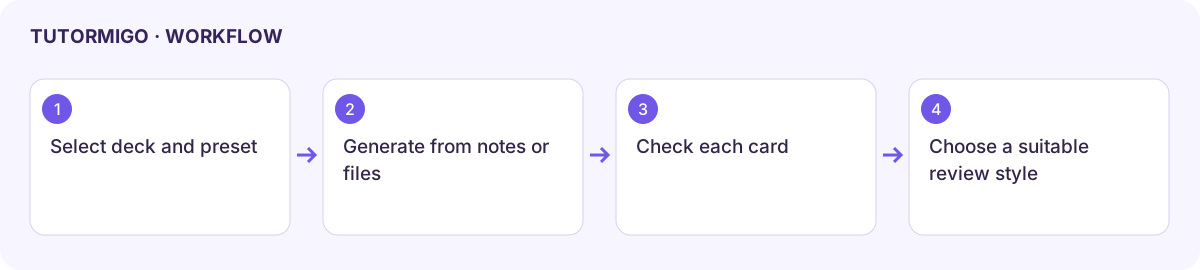
Section titled “Generate a reviewable set”- Open Generate cards and choose whether the cards go into the selected deck or a new deck.
- Choose the preset: general study, vocabulary, spelling, concepts and definitions, speech/script memorization, interview practice, discussion preparation, or alphabet and numbers.
- Set the deck title when creating a new deck, subject, topic, and card count. Enter Prompt or notes, attach supported Reference files, or use both.
- Review the answer-image option. Use the available prompt expansion when helpful, then reread the expanded request before generation.
- Generate and inspect each card’s front, back, and source accuracy. Correct unsuitable cards before review. Generated spelling cards should not reveal the answer on the front.
Choose how to practise
Section titled “Choose how to practise”| Style | How to use it |
|---|---|
| Classic | Recall first, reveal the answer, and rate your recall honestly. |
| Listen & Spell | Listen through the provided audio controls, type the spelling, and check the result. |
| Say It | Use the offered speech/practice panel to recite the response, then compare it with the answer. |
| Sentence Gap | Attempt the missing part before revealing or checking the complete sentence. |
Styles and audio capabilities depend on the card and browser. Use the displayed auto-read, recite, and picture controls when offered. A style label does not guarantee every card is suitable for that practice.
Deck and review scope
Section titled “Deck and review scope”Distinguish due-card review from reviewing the whole selected deck. Edit card content and deck organization through the offered controls, then verify the saved result. Use Again, Hard, Good, and Easy according to actual recall; generous ratings can postpone needed review.
Inspect the completed summary and refresh the retention dashboard when needed. If generation or speech fails, preserve the deck and source notes before retrying.
Workflow at a glance
Section titled “Workflow at a glance”