Review projects, labs, worlds, and multimodal activity
These tools support project-based and immersive learning when enabled. Some student Portfolio and Pathways entry points are marked non-production, so verify release and account availability before assigning them.
Review projects
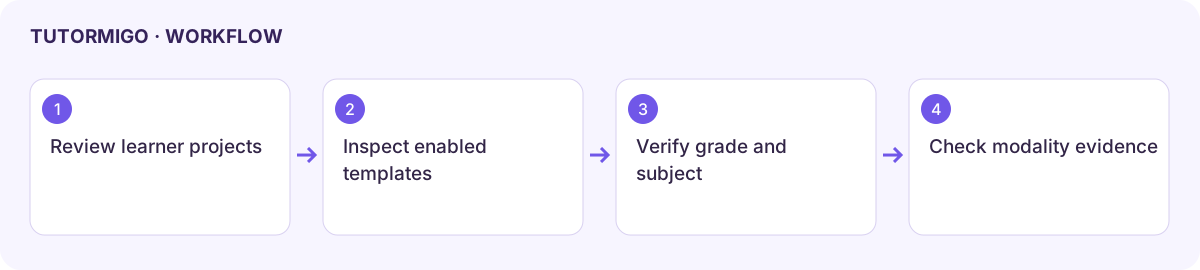
Section titled “Review projects”Open Projects and inspect the learner, project title, type, and status. Compare progress with milestones and actual evidence through the available views. The reviewed teacher Projects page provides visibility rather than a full project editor.
Create a basic lab or world
Section titled “Create a basic lab or world”- Open Labs or Worlds, enter the title required by the current form, and use Create.
- Check the saved entry and its subject and grade band. The reviewed basic forms use Science / 6–8 for Labs and Math / 6–8 for Worlds; they do not expose full subject and grade selectors.
- Inspect the actual template and available activity controls before presenting it to learners.
- Use the offered analytics control for Worlds and verify that a result is visibly displayed before relying on it. A completed request alone is not a usable report.
Inspect multimodal evidence
Section titled “Inspect multimodal evidence”Open Multimodal and read Event Mix for text, voice, image, whiteboard, and handoff activity. Compare modality use with learning outcomes rather than assuming more visual or voice interaction is better.
Current limitation: the reviewed basic multimodal assignment action uses a predefined learner and prompt. It is not a learner-selectable assignment form, so do not use it for a real class until the intended target is confirmed through a supported control.
If templates or evidence are absent, check configuration and the learner’s recorded activity. Use accessible summaries and 2D fallbacks for immersive material where provided.
Workflow at a glance
Section titled “Workflow at a glance”